
Use the PTT Button on Your Sensear Headset to Key Up Your MOTOTRBO™ Radio Over Bluetooth®

Sensear’s latest firmware adds Bluetooth® PTT integration between selected Sensear headsets and MOTOTRBO™ portable radios. With this update, workers can press the PTT button on their Sensear headset to key a compatible MOTOTRBO™ radio wirelessly over Bluetooth®, eliminating the need for a wired in-line PTT cable to the radio or an external PTT cable.

This capability is designed for noisy and demanding environments where crews need reliable radio communication, certified hearing protection, and the freedom to move without cable clutter or snag points.

Note: Functionality is dependent on MOTOTRBO™ radios equipped with Bluetooth® wireless technology and having the appropriate Motorola software licenses enabled for Bluetooth® PTT.

A-female-engineer-repairing-a-production-line-machine

What This Update Does:

The Bluetooth PTT integration adds support for the MOTOTRBO™ Bluetooth® PTT protocol to the following Sensear headsets:

• SM1P02

SM1P02-IS

• SM1P02-Ex

• SM1P02-ISDP

• SM1P02-ExDP

• SM1P03

Once the headset firmware is updated and the correct licenses are applied to the MOTOTRBO™ radios, the headset PTT button becomes the primary PTT interface. Instead of reaching for the radio or an in-line PTT, workers simply press the button on the headset to transmit, while the noise-canceling boom microphone and SENS® Technology handle clear communication and situational awareness.

shutterstock_413255164

Who Is This For?

This integration is ideal for organizations that already rely on MOTOTRBO™ portable radios and want to simplify how workers communicate in high-noise environments. If your teams use SM1P02, SM1P02-IS, SM1P02-Ex, SM1P02-ISDP, SM1P02-ExDP, or SM1P03 headsets and have MOTOTRBO™ portables equipped with Bluetooth® wireless technology, this feature lets you remove an extra cable from the system and make the headset the natural place to PTT.

It’s especially helpful in areas with moving equipment, vehicles, or tight spaces, such as refineries, mines, processing plants, utilities, data centers, and heavy manufacturing, where reducing snag hazards and keeping hands on tools can support both safety and productivity.

HDR_SHIPPING_IMG - Copy

How Sensear + MOTOTRBO™ Bluetooth® PTT Works

At a high level, the workflow is straightforward:

  1. A Sensear headset (SM1P02 / SM1P02-IS / SM1P02-Ex / SM1P02-ISDP / SM1P02-ExDP / SM1P03) is paired over Bluetooth® to a compatible MOTOTRBO™ portable radio.

  2. The radio’s firmware and licenses allow it to accept PTT control via Bluetooth® AT commands.

  3. When the worker presses the PTT button on the headset, the radio is keyed wirelessly.

  4. Sensear’s noise-canceling boom microphone and SENS® Technology manage intelligible speech and 360° situational awareness while protecting hearing.

From the user’s perspective, the radio can stay on the belt or in a pocket. The headset becomes the main interaction point for both hearing and transmitting.
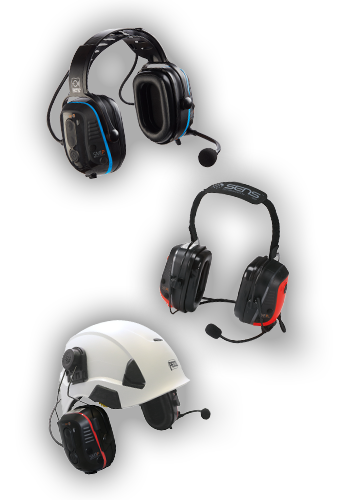
BT Headsets-3

Supported Sensear Headsets

Bluetooth® PTT integration with MOTOTRBO™ radios is available on:

• SM1P02 – Smart industrial headset for high-noise communication

• SM1P02-IS – Intrinsically safe for hazardous locations

• SM1P02-Ex – ATEX-rated headset for explosive atmospheres

• SM1P02-ISDP – Dual protection, intrinsically safe for extreme noise hazardous locations

• SM1P02-ExDP – Dual protection, ATEX-rated headset for explosive atmospheres

• SM1P03 – Next-generation smart headset with advanced connectivity options

All of these headsets are designed for loud, mission-critical environments and combine hearing protection, 360º situational awareness, and flexible connectivity to two-way radios and Bluetooth® devices.


MOTOTRBO™ Radio Compatibility & Required License

On the radio side, Bluetooth® PTT depends on the capabilities and licensing of the MOTOTRBO™ portable itself. To be compatible, radios must:

  1. Include integrated Bluetooth® hardware, and

  2. Have the “AT Commands for Bluetooth® PTT” CFS (Charge-For-Software) license enabled
    (typically part number HKVN4465A, though exact codes can vary by region and model).

Only certain MOTOTRBO™ product families combine Bluetooth® wireless technology and AT-based PTT support. The table below summarizes the primary radio families by region that can support Sensear’s Bluetooth® PTT integration.

Compatible MOTOTRBO™ Portable Radios

Region


Compact / Small Form-Factor Radios (DP3xx1e family & equivalents)

Full-Size / Display Radios (DP4x01e family & equivalents)


R7 Family


APME
XiR E8600i Series (e.g. XiR E8600i, XiR E8628i)
XiR P8600i Series
MOTOTRBO R7, R7Ex
EA
DP3441e, DP3661e
DP4401e, DP4601e, DP4801e
MOTOTRBO R7, R7Ex
LACR
DGP8050e Elite
DGP8000e / DGP5000e Series
MOTOTRBO R7, R7Ex
NA - XPR7000e Series (e.g. XPR7350e, XPR7380e, XPR7550e, XPR7580e, XPR7580e IS) MOTOTRBO R7, R7Ex


*These families are the primary MOTOTRBO™ portable platforms that can support Bluetooth® + AT Commands PTT (HKVN4465A or regional equivalent) for use with Sensear’s headset PTT over Bluetooth®. Customers must still verify license presence and exact model support on their own radios.

Important notes:

  • R7a models do not include Bluetooth® hardware and are not supported.

  • Regional branding can differ; for example, XPR7000e, DGP8000e, and XiR P8600i may be regional equivalents of the DP4x01e platform.

Because radio configurations and licenses vary, customers should always work with their Motorola / MOTOTRBO™ radio partner to confirm that their specific models are supported and properly licensed.


Who Provides and Verifies the License?

The AT Commands for Bluetooth® PTT license is a Motorola CFS license that is:

  • Sold and installed by the radio distributor/dealer, not by Sensear.

  • Verified using CPS or CPS2 (Customer Programming Software).

To confirm that a radio is ready for Sensear Bluetooth® PTT, your radio partner should check:

Configuration → Feature Sets → Bluetooth® Accessory Commands

If this feature is present and enabled, the radio is licensed for AT-based Bluetooth® PTT. This cannot be confirmed simply by looking at firmware versions or codeplug information.


Sensear Utility & Firmware Requirements

On the headset side, customers must use the Sensear Utility V2 application to upgrade firmware and enable MOTOTRBO™ Bluetooth® PTT support.

The Utility App:

• Must be at minimum version SUAV2 1.44 (or later).

• Can run on the Sensear Programming Tablet or on a compatible Android device.

• Automatically detects the connected headset and displays available configurations and firmware.

The Sensear Android Tablet Quick Guide walks users through launching the Utility App, connecting a headset, and performing configuration and firmware updates.

Required Firmware Versions

For the integration to work, Sensear headsets must be updated to the following minimum firmware levels:

• Main Application firmware (all models):

- SW00.0128.04.04 (sometimes displayed as SW00-0128-04-04)

- Visible in the Utility App under Device → Firmware Types → Main Application when the headset is connected.

• Additional requirement for SM1P03:

- Cypress Bluetooth firmware: SW00-0141-01-01 or later

- Also shown under Firmware Types in the Utility App for connected SM1P03 units.

After updating the firmware, users should remove any existing Bluetooth® pairing between the headset and MOTOTRBO™ radio, then re-pair the devices so the radio recognizes the updated headset capabilities.


Getting Started: Typical Implementation Steps

Most customers follow a three-step process to enable Sensear Bluetooth® PTT with MOTOTRBO™ radios:

  1. Confirm equipment
    Verify that you are using SM1P02, SM1P02-IS, SM1P02-Ex, SM1P02-ISDP, SM1P02-ExDP, or SM1P03 headsets and MOTOTRBO™ portable radios equipped with Bluetooth® wireless technology from the compatible families listed above.

  2. Confirm radio licensing
    Work with your Motorola / MOTOTRBO™ partner to ensure that your radios support AT-based Bluetooth® PTT and have the “AT Commands for Bluetooth® PTT” CFS license (HKVN4465A or regional equivalent) installed and enabled in CPS/CPS2.

  3. Update and pair your Sensear headsets
    Use Sensear Utility V2 (SUAV2 1.44 or later) on a Sensear Programming Tablet or supported Android device to update the Main Application firmware to SW00.0128.04.04 (and for SM1P03, the Cypress Bluetooth® firmware to SW00-0141-01-01). Once the updates are complete, re-pair your headsets and radios over Bluetooth® and confirm that pressing the headset PTT keys the radio.

In simple terms: your radio partner provides and configures the Bluetooth® PTT license on the MOTOTRBO™ side, and Sensear provides the firmware and tools to enable Bluetooth® PTT on the headset side. When both pieces are in place, the Sensear headset PTT can key your MOTOTRBO™ radio over Bluetooth®.


Need Help Implementing Bluetooth® PTT with MOTOTRBO™?

Because every site’s radios, licenses, and headset mix can be different, Sensear works closely with customers and their radio partners to plan and deploy Bluetooth® PTT in a way that fits their environment.

If you would like help with:

  • Reviewing your current Sensear headsets and MOTOTRBO™ radios for compatibility

  • Understanding firmware, Utility, and configuration requirements

  • Designing a pilot or phased rollout in your high-noise areas